Moin.

Let the house do the remembering.

ToHuus Hub keeps track of what's in the fridge, where the parcel tape lives and what's for dinner. A free, open-source app for the whole family, running on your own server.

Allns an sien Platz.Low German for "everything in its place". That's the whole idea.

3
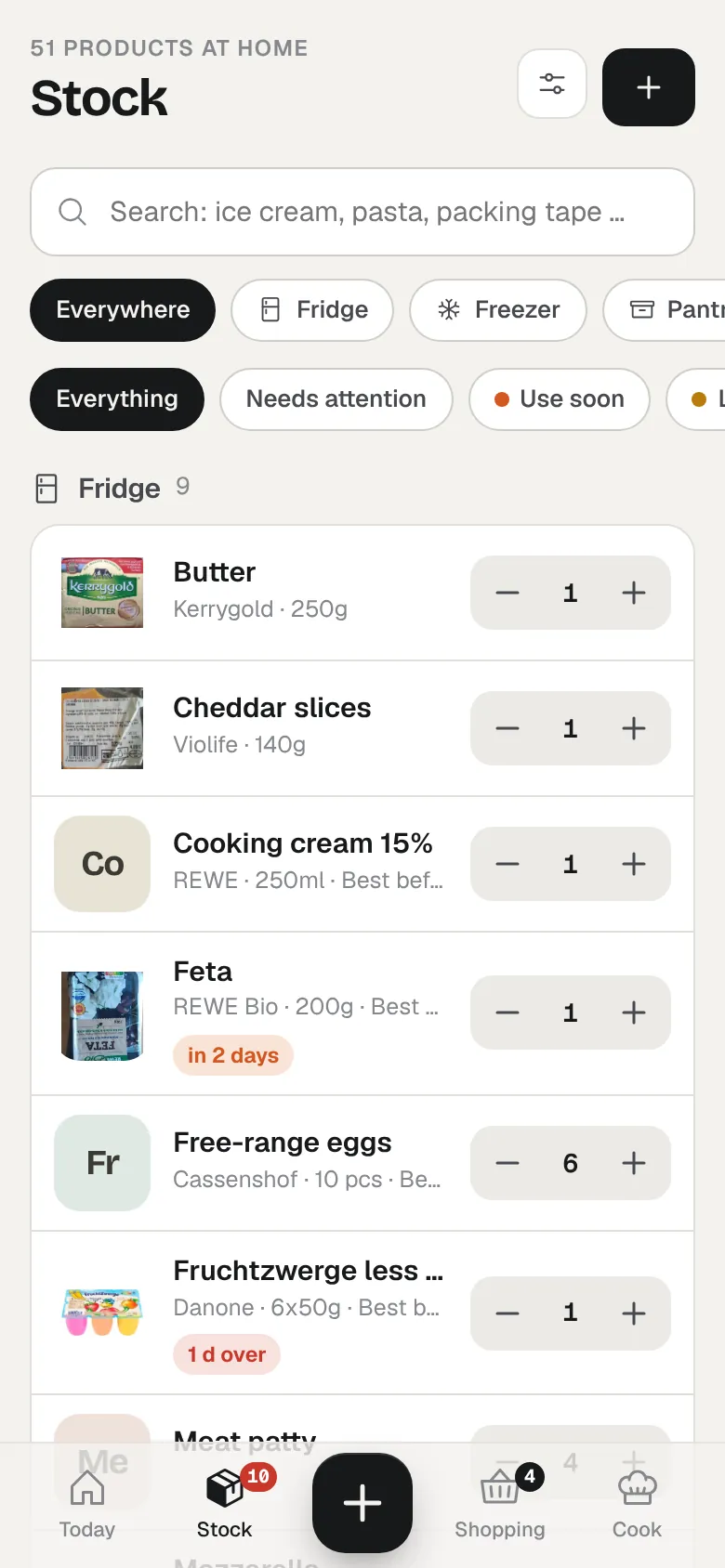
    • 14 things in the fridge Milk is out. Already on the list. Pesto: opened Tuesday, eat first Tonight: gnocchi skillet with tomato
    • 9 things, 2 to use soon Fish fingers: 1 pack left Chili leftovers, frozen with a new date Ice cream is on the sofa menu
    • Parcel tape Shelf by the door, box "post & parcels" QR label on the box: scan, one tap Water filter: due this week
    • Pasta, tins and the rest Pasta: 3 packs, oldest gets used first Tinned tomatoes: running low
    • 2 crates of water Cola: gone after the party, on the list Wine rack: 3 bottles
    • The mirror cabinet Plasters: top shelf, left Toothpaste: 1 left, on the list Smoke detector test: once a year
    • Christmas lights Box 3, under the round window Not counted. Just easy to find.
    A weekend at ours

    Not a feature list. A weekend.

    ToHuus Hub shows up in small moments, the ones where you'd otherwise shout up the stairs. Here's what that looks like on an ordinary Saturday and Sunday.

    Saturday
    09:30Coffee, notebook

    "What do we eat this week?"

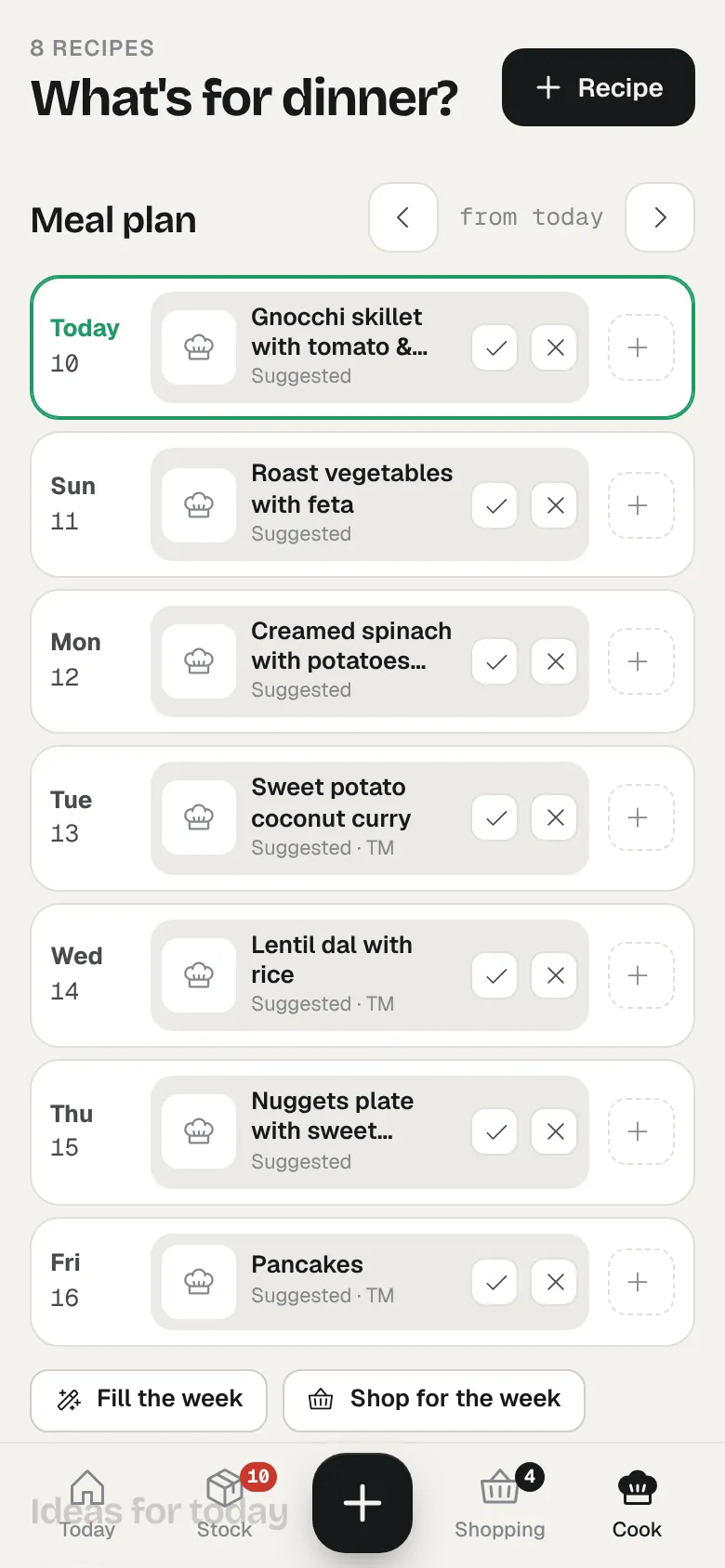
    The usual Saturday question. ToHuus Hub fills the empty evenings with recipes that fit what's already in the house: what has to go first, what you like, what you haven't had in a while. One more tap puts every missing ingredient on the shopping list.

    On Wednesday friends ask you out? "We're eating out tonight" moves the rest of the week back by a day.

    • Week plan
    • Ranked by stock & best-before
    • Cookidoo week via Home Assistant
    Week plan with a suggested dinner for every evening

    Wednesdayout for pizza. plan just moves.

    10:40Waiting for the pickup

    "Can you grab wrapping paper?"

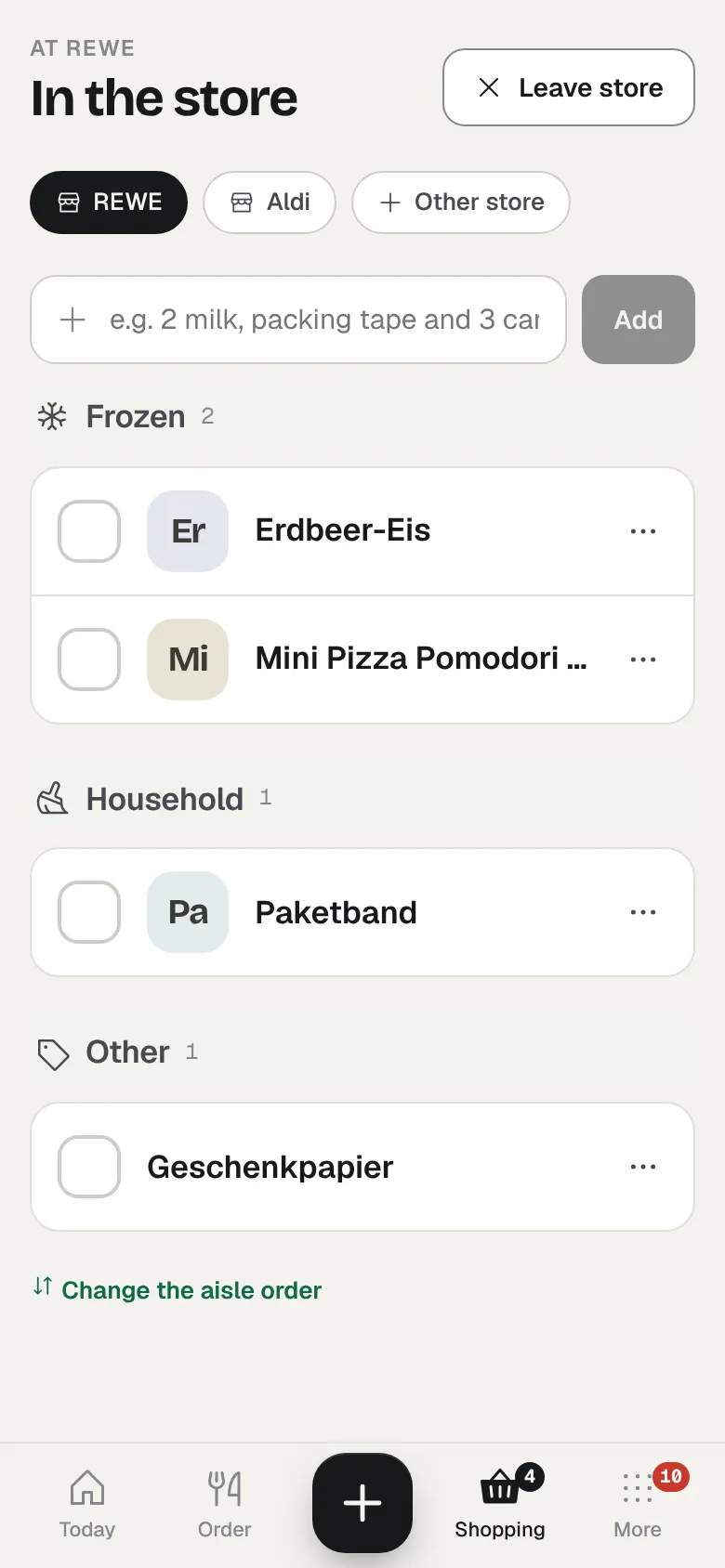
    The REWE order is still being packed, so Lea goes in for the few things it forgot. In store mode the list is sorted by aisle, in the order she usually walks that shop, and it keeps working at the back where the signal gives up.

    At home you type "wrapping paper and 2 milk" into the list and it shows up on her phone a moment later. Anything someone tapped "I'll get it" on carries their name, so nobody buys the cream twice. At the till, "done shopping" books the whole basket into stock.

    • New: store mode
    • Aisle order per shop
    • Works offline
    • "I'll get it"
    • Push to the phone
    Shopping list in store mode, grouped by aisle for one shop

    Lea · REWEfrozen aisle first, then out.

    11:20Back home

    Nobody types in the shopping.

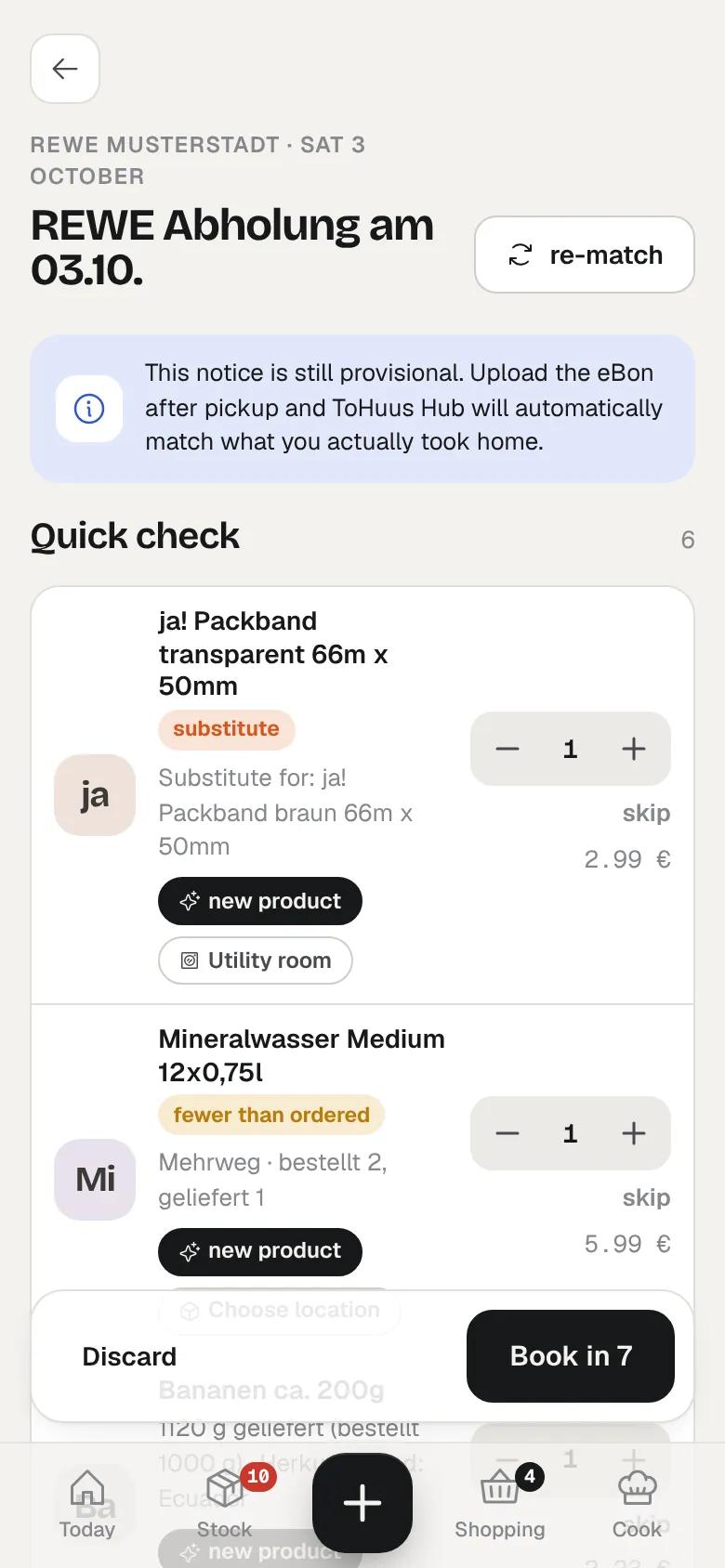
    Upload the pickup notice and the eBon instead. ToHuus Hub reads both, matches the order against the receipt and shows what changed: the substitution, the item that wasn't there, the new product that still needs a shelf. You check it once and it's in stock.

    Receipt photos, QR receipts and pasted text work too. Right now the parsers know REWE; other shops are welcome as contributions.

    • Order + receipt reconciliation
    • Learns receipt abbreviations
    • Barcode scan
    Import review of a grocery pickup with one substitution and one reduced quantity

    Reviewthey swapped the tape. fine.

    15:10Parcel half packed

    "Where's the parcel tape?"

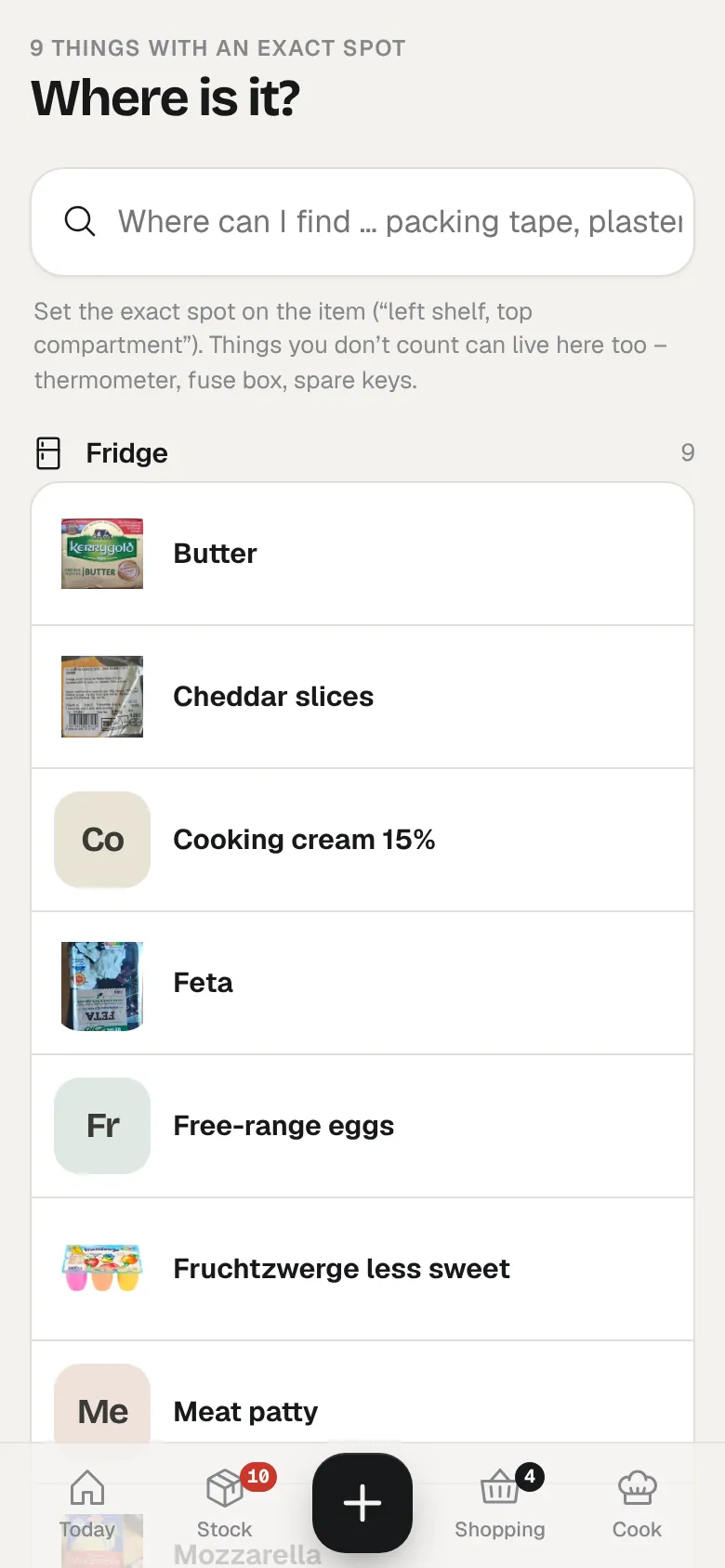
    Every room gets a short direction and every thing can get an exact spot. Type "tape" and the answer is: utility room, shelf by the door, box "post & parcels".

    That box has a QR label we printed from the app. Point the phone camera at it and one tap takes a roll out of stock. If it was the last one, the tape goes straight on the list.

    • Where is what
    • Exact spots per item
    • New: QR labels
    Where is it? search with exact spots for each item

    Utility roombox "post & parcels"

    17:45Standing at the open fridge

    One look, and you know.

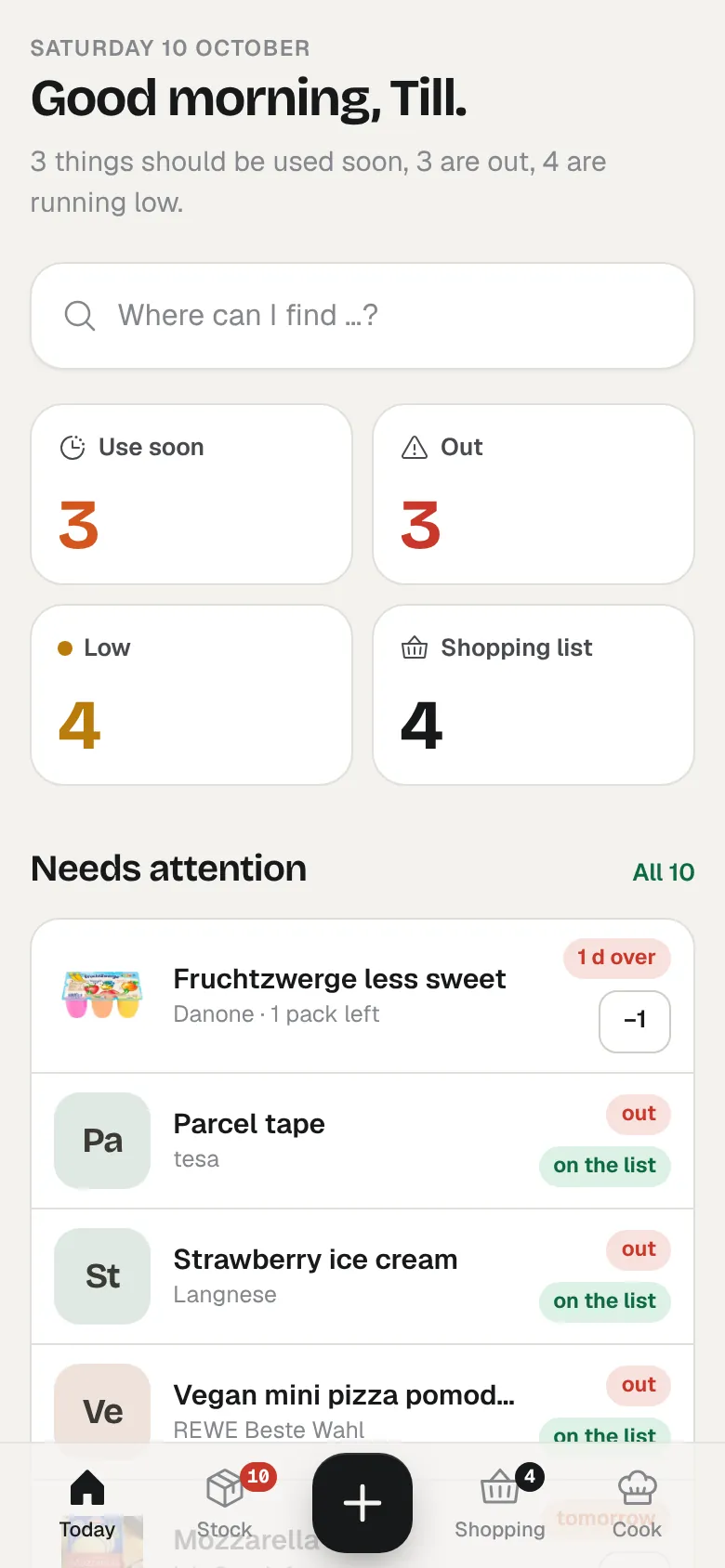
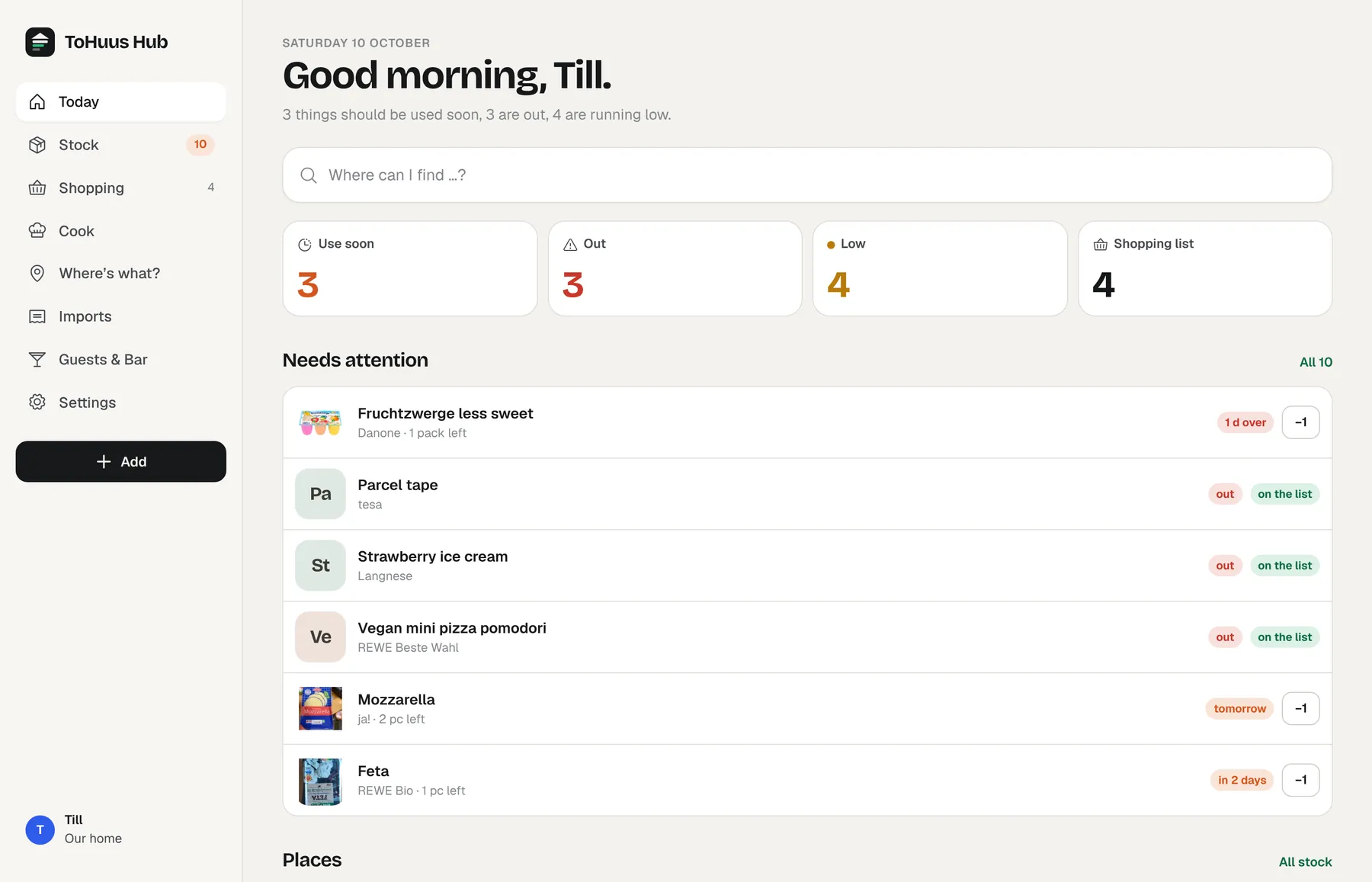
    The Today screen shows the whole house at once: what needs using up, what's gone, what's running low, what's on the list and tonight's best recipe. Finished the yoghurt? One tap.

    Opened things run on their own clock. The pesto jar from Tuesday and the chili left over from Thursday sit under "eat first", and something you put in the freezer gets a new date instead of quietly expiring.

    • Today
    • Eat first
    • Opened, frozen, leftovers
    • Best-before per batch
    Today screen: three things to use soon, three that are out, four running low

    Fridgemilk!! (already on the list)

    19:20Friends over

    The TV takes the orders.

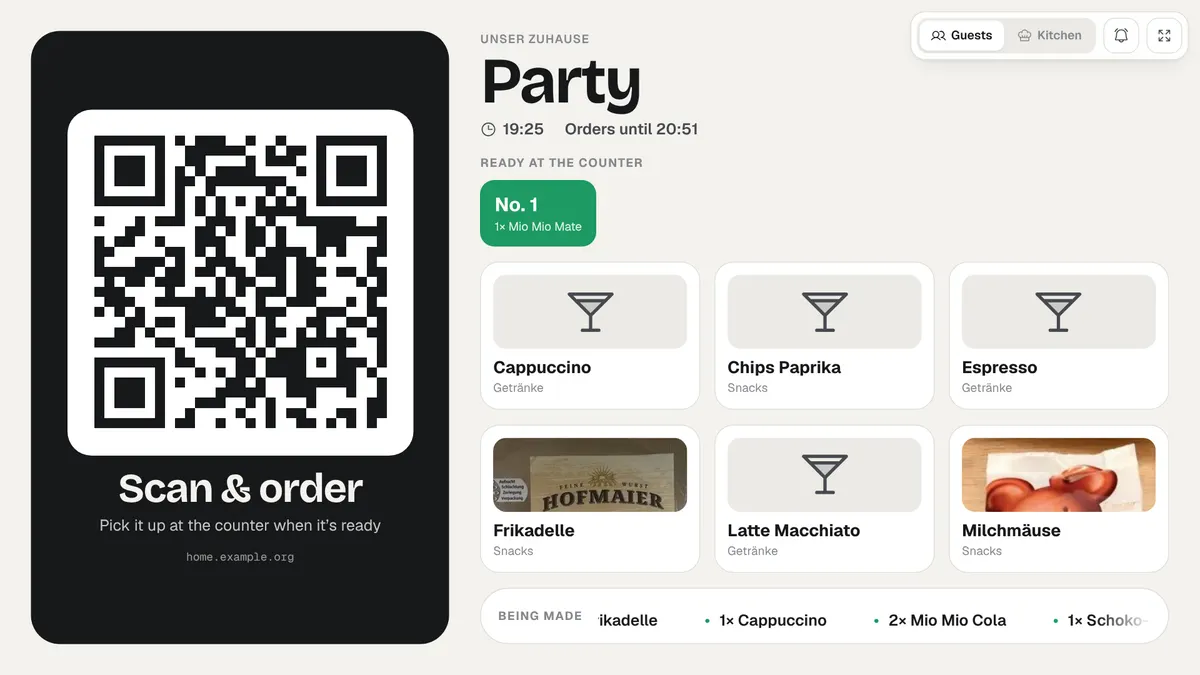
    Two taps start a party. The TV shows a QR code and what's on the menu tonight. Guests scan it and order from their own phones, picking from what's actually in the house. The kitchen works through new, in progress and ready, and the TV shows which numbers can be picked up at the counter.

    If two people want the last cola, the first order gets it. When nobody has ordered for a while the party ends by itself, and the recap puts whatever ran out on the shopping list.

    Most evenings it's smaller. Lea on the sofa orders a cappuccino, extra hot, and whoever is in the kitchen gets a push. If you like, the whole app dresses up as "Fredirando", a slightly silly home-delivery service in orange.

    • New: party mode
    • TV board & kitchen view
    • Order from the sofa
    • Guest bar via QR
    Party board on the TV: a QR code to order, the menu, and order number 1 ready at the counter

    Lea · sofacappuccino, extra hot

    Sunday
    09:05Coffee's brewing

    One minute with the fridge.

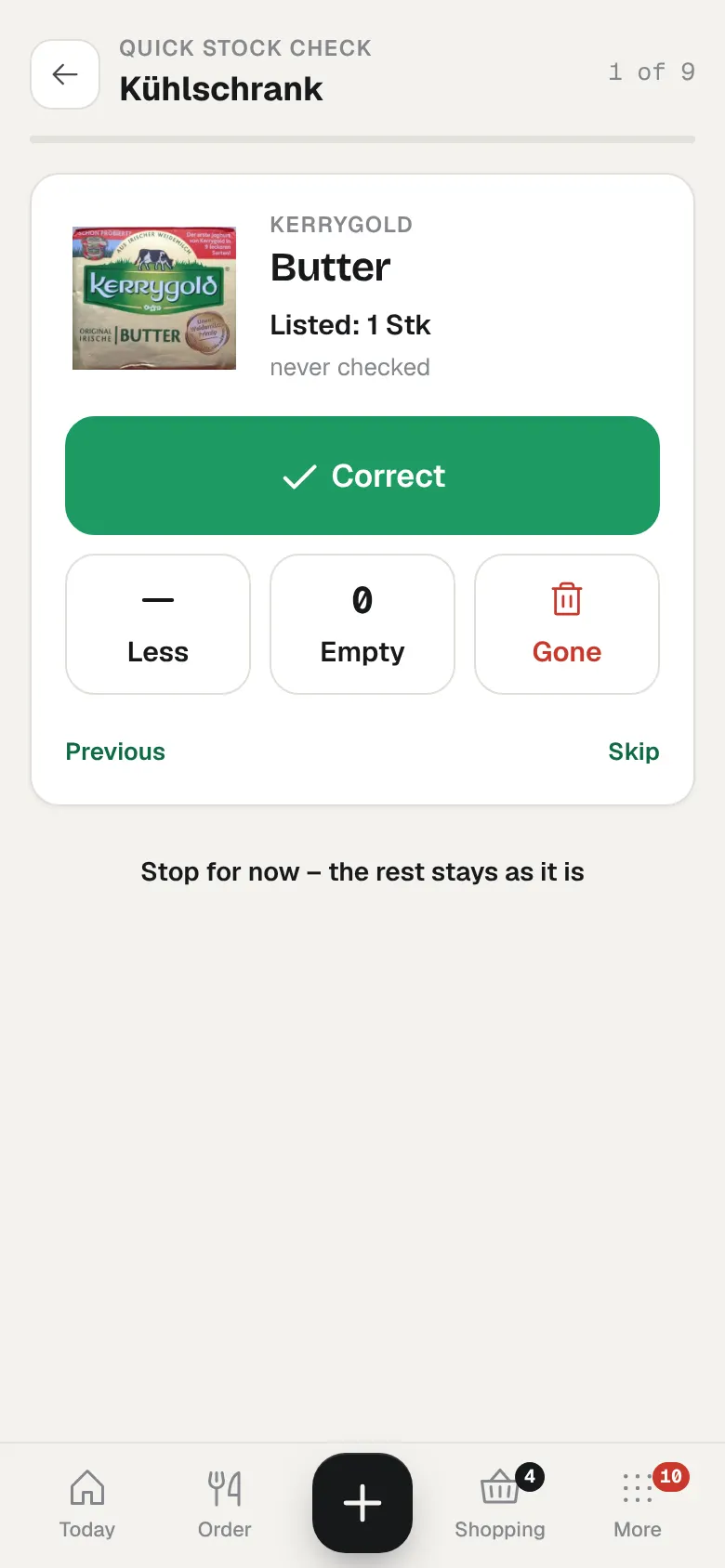
    After a party the numbers drift. Quick check goes through one shelf, one tap per item: right, less, empty, gone. Butter, right. Yoghurt, gone. About a minute later the count is honest again, and the week plan works from what's really there.

    Once a month a small card shows what got thrown away. It doesn't scold. It just helps you notice.

    • New: quick check
    • One tap per item
    • Monthly waste card
    Quick check of the fridge: butter, with buttons for right, less, empty and gone

    Fridgedone before the coffee.

    18:30Doorbell, night out

    The babysitter is here.

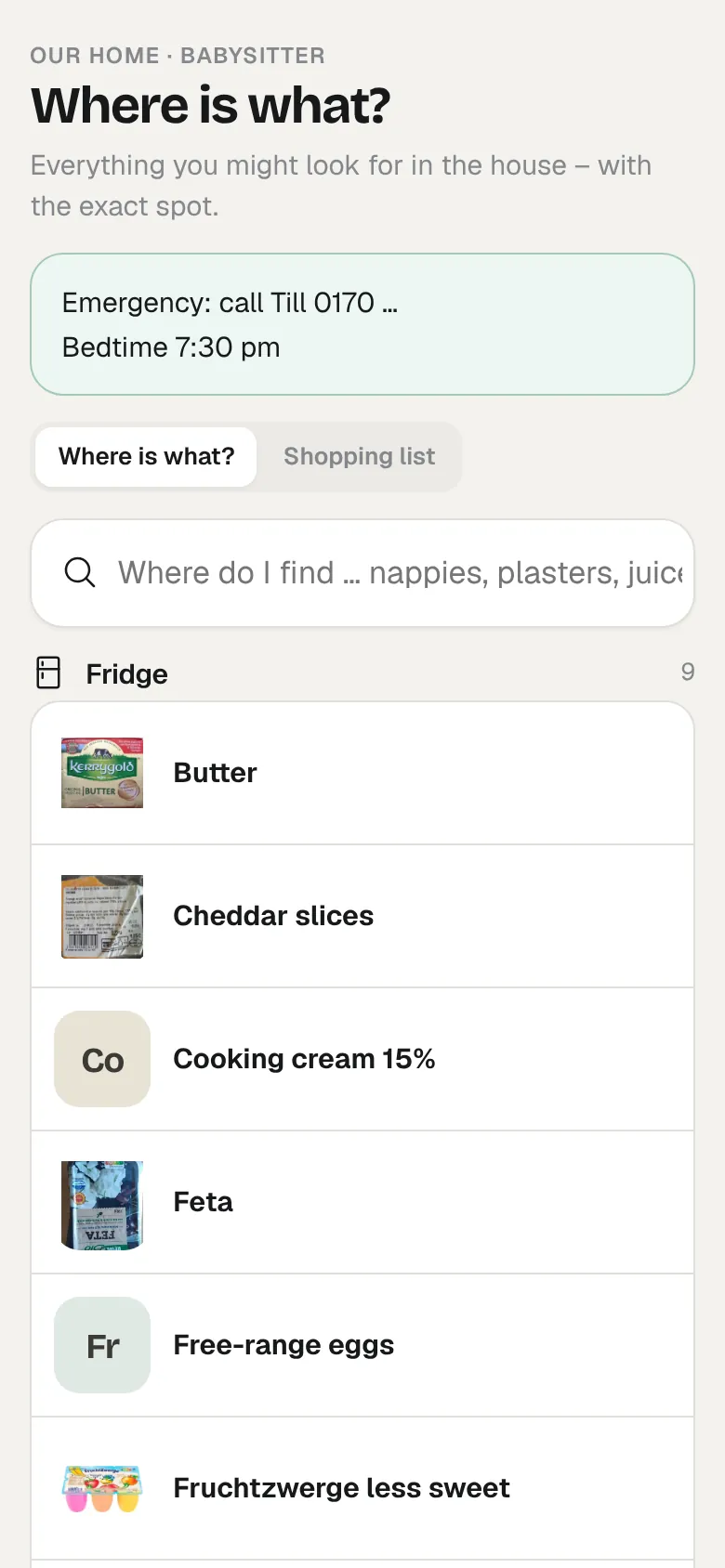
    Instead of a page of notes on the counter, she gets a link. It opens exactly the "where is what" search, with your note on top: emergency numbers, bedtime, which story has to be read twice.

    Guest links show names and places, never quantities, and they expire on their own.

    • Babysitter link
    • Read-only
    • Your note on top
    Babysitter view with an emergency note and a search for where things are

    For the sitterbedtime 7:30. story first!

    House rules

    What's stuck to our fridge door.

    The rules we built the app around. They're the reason it still gets used after the first week.

    • Half full is an answer.

      Fruit, veg and bread are just full, half, low or empty. Packets and bottles get counted. Coffee from the machine isn't tracked at all.

    • Nobody types in the shopping.

      Stock comes in through receipts, orders, photos and the barcode scanner. Typing is the fallback, not the plan.

    • Nobody keeps it all in their head.

      Built for brains that forget things: few taps, gentle nudges instead of a wall of data, and it still works on a bad day.

    • Guests see names, not numbers.

      Babysitter and guest links show places and the menu. Quantities, the rest of the house and your settings stay private.

    • Opened is a different clock.

      An open jar doesn't keep like a closed one. Opened, frozen and leftover things get their own dates and move up to "eat first".

    • The house has chores too.

      Water filter, smoke detectors, descaling, tyres, passports. They come back on their own, and the spare filter cartridge lands on the list.

    • It stays in the house.

      One SQLite file on your own server. No account with us, no telemetry, no cloud in between.

    • Shopping

      • milk
      • parcel tape
      • oat milk for Lea
      • water filter
      The real list lives in the app, on every phone.
    The kitchen drawer

    Everything else is in here.

    • RecipesImport from any recipe site, a HelloFresh card or a photo. Thermomix steps keep their time, temperature and speed.
    • SpendingMonthly totals by shop and category, straight from the receipts, plus a hint when something got more expensive.
    • NotificationsWeb push to installed phones, with buttons in the notification. Or ntfy, a webhook, e-mail, Home Assistant.
    • VoiceThe shopping list syncs with a Home Assistant to-do list, so Assist or Siri can add to it.
    • FamilyInvite the others with a link. Everyone picks their own password, nobody shares yours.
    • BackupsNightly snapshots, restore from the app, and an optional copy to WebDAV or Nextcloud.
    Phone, tablet, laptop

    Same house, bigger screen.

    It's a web app. Add it to your phone's home screen, or leave it open on the tablet in the kitchen. On wider screens it opens up into a calm layout with a sidebar.

    ToHuus Hub in a desktop browser with sidebar navigation
    To Huus Low German for "at home" [toː huːs] · Plattdeutsch, spoken along the North Sea and the Baltic
    How it started

    We built it for our own cellar.

    We're Till and Lea, a family with a small kid in northern Germany. Our house has a fridge, a chest freezer in the cellar, a pantry that's never quite tidy and a utility room where things go to hide.

    For years one of us knew where everything was and what was running out, and the other one asked. That works until it doesn't: the third bottle of ketchup, the parcel tape nobody can find, the "didn't you buy milk?" at six in the evening.

    So we built ToHuus Hub for ourselves, with a lot of help from Claude. The one rule: it has to work on a tired Tuesday, so nobody has to keep it all in their head. Now it runs on a small server at home and everyone in the house uses it.

    It's free and AGPL-licensed. There's no company behind it, no paid tier and nothing to sign up for. If it helps your household too, that makes us happy. Issues and pull requests are welcome.

    Till & Lea
    For whoever runs the server

    Small, boring, yours.

    One Docker container, one SQLite file. It runs happily on a NAS or a small VPS and never phones home. Anything that talks to the outside world is optional, and you decide whether to switch it on.

    Via MCP, from your phone
    freezer.jpg
    Here's the freezer drawer. Put this into ToHuus Hub.
    Done. 6 items for the chest freezer are waiting in your review queue.
    ToHuus HubPacking slip · self-hosted
    Runs on
    Docker, on a NAS or small VPSabout 60 MB RAM
    Your data
    One SQLite fileplus JSON export
    Telemetry
    Noneand no account with us
    Licence
    AGPL-3.0
    AI assistants
    MCP server, 20 toolsClaude, ChatGPT and other MCP clients
    Smart home
    Home Assistantsensors, rest_command, actionable push
    Notifications
    HA, ntfy, webhook, e-mail
    Languages
    English, Germana new one is a single file
    Photo reading
    Optionalany OpenAI-compatible vision model, e.g. Mistral in the EU or Ollama at home
    Barcodes
    Phone cameraproduct data from Open Food Facts
    Total€0.00

    Danke. See you at home.

    Install

    Moved in within a few minutes.

    All you need is Docker, on a NAS at home or a small VPS. No licence key, no account, no cost.

    1. Save the compose fileSet BASE_URL, your name and a password.
    2. Start itdocker compose up -d, then open http://localhost:8080.
    3. Want to look around first?Set SEED_DEMO: "true" before the first start and you get a demo household.
    4. Put it behind HTTPSYour usual reverse proxy is fine. Then add it to your phone's home screen.
    docker-compose.yml
    services:
      tohuus:
        image: ghcr.io/tillheidrich/tohuus-hub:latest
        container_name: tohuus-hub
        restart: unless-stopped
        ports:
          - "8080:8080"
        volumes:
          - ./data:/data
        environment:
          BASE_URL: https://home.example.org
          ADMIN_NAME: Alex
          ADMIN_PASSWORD: change-me
          LANGUAGE: en          # or de
          SEED_DEMO: "false"
          # optional, for photo imports:
          # VISION_BASE_URL: https://api.mistral.ai/v1
    or build from source
    git clone https://github.com/tillheidrich/tohuus-hub.git
    cd tohuus-hub
    cp .env.example .env
    docker compose up -d --build
    Moin.

    Come on in.

    "Moin" is how the north says hello, at any time of day. Put ToHuus Hub on your own server and let the house do the remembering.